
Use a trackable link or QR code
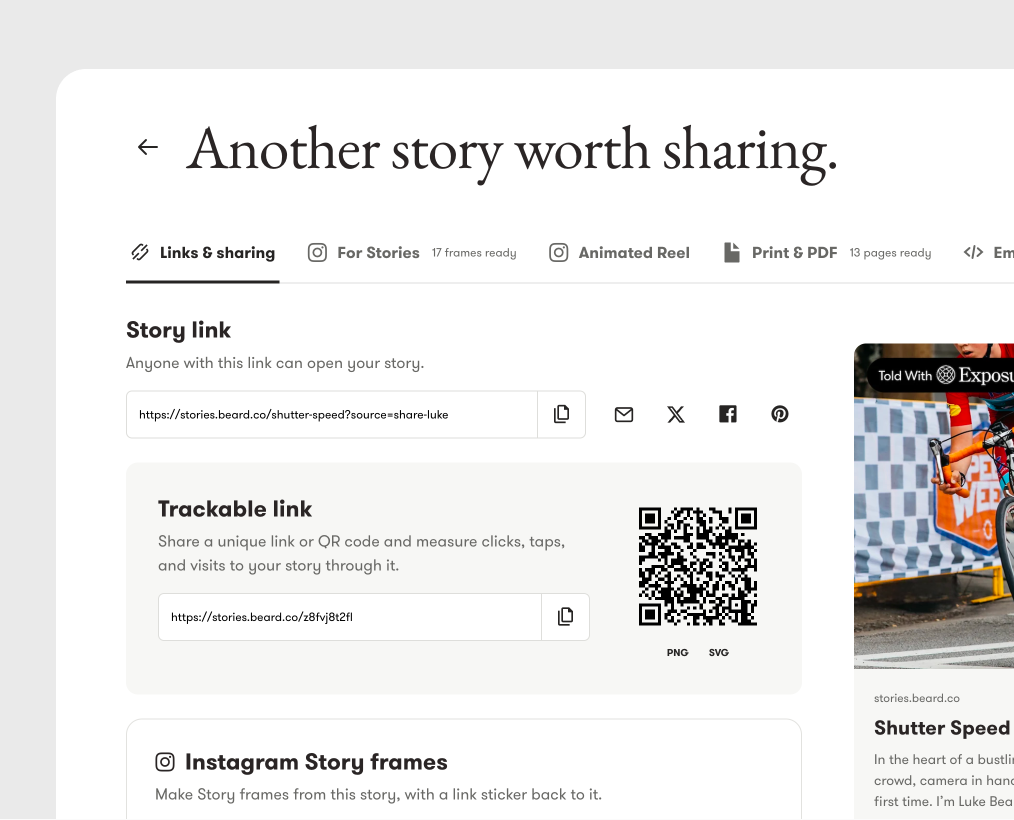
A trackable link sends people to your story and records clicks through that link. It is available with Pro Plus and above plans.
Get the link
Section titled “Get the link”- Open your story’s share page.
- Select Links & sharing.
- Find Trackable link below Story link.
- Select Generate trackable link.
- Use its copy icon, then paste the link where you want to share it.
Your story must be published. The button does not appear if the story already has a trackable link, because Exposure keeps one link for each story. Its address does not change later.
If the section shows an example link and a closed lock, your plan does not include this feature. The help text below the lock reads Available with Pro Plus and above plans.
Download the QR code
Section titled “Download the QR code”Select PNG or SVG below the QR code. Use PNG as an image, or SVG when you need a scalable graphic for a design or print layout.
The QR code contains the trackable URL. Test it before you print or distribute it. A domain or plan change can stop that URL from opening the story.
Read the results
Section titled “Read the results”In Stats, find Trackable link clicks. Choose 7 days, 30 days, 90 days, or 1 year to see total clicks, daily counts, traffic sources, and devices. The default range is 30 days. A custom range must be less than 365 days.
These counts measure clicks through the trackable link, including taps from a phone. They are not a count of unique readers. Visits through the regular story link do not become trackable-link clicks.
Tracking links shared with readers is separate from tracking clicks on links inside a story.
Need help?
Section titled “Need help?”Use the Exposure contact form.